Best Gaming Mice for MMO, Macros & Everyday Use in 2026
🇺🇸 USA & Global Buying Guide: Products, Amazon customer ratings, and curated deals in this guide are sourced from Amazon.com ($ USD).
 35% OFF
Razer Naga V2 HyperSpeed Wireless MMO Gaming Mouse – 19 Programmable Buttons, 12-Button Thumb Grid, Focus Pro 30K Optical Sensor, HyperScroll Wheel (Black)
- 19 fully programmable buttons including an ergonomic 12-button mechanical thumb matrix
- Razer Focus Pro 30K optical sensor delivers unmatched 30,000 DPI and tracks on pure glass
Short Answer: Top Picks At a Glance
Razer Naga V2 HyperSpeed Wireless MMO Gaming Mouse – 19 Programmable Buttons, 12-Button Thumb Grid, Focus Pro 30K Optical Sensor, HyperScroll Wheel (Black)
Best balance of verified build quality, manufacturer specs, and price.
View Specs & Deal →Corsair Scimitar RGB Elite Wired MOBA/MMO Gaming Mouse – 17 Programmable Buttons, Patented Key Slider 12-Button Thumb Cluster, 18,000 DPI Sensor (Black)
Delivers essential capabilities at an accessible, budget-conscious price.
View Specs & Deal →Razer Basilisk V3 Customizable Ergonomic Gaming Mouse – Focus+ 26K DPI Optical Sensor, HyperScroll Tilt Wheel, 11 Programmable Buttons, 11 Chroma RGB Zones (Black)
Premium alternative for shoppers wanting specialized capabilities.
View Specs & Deal →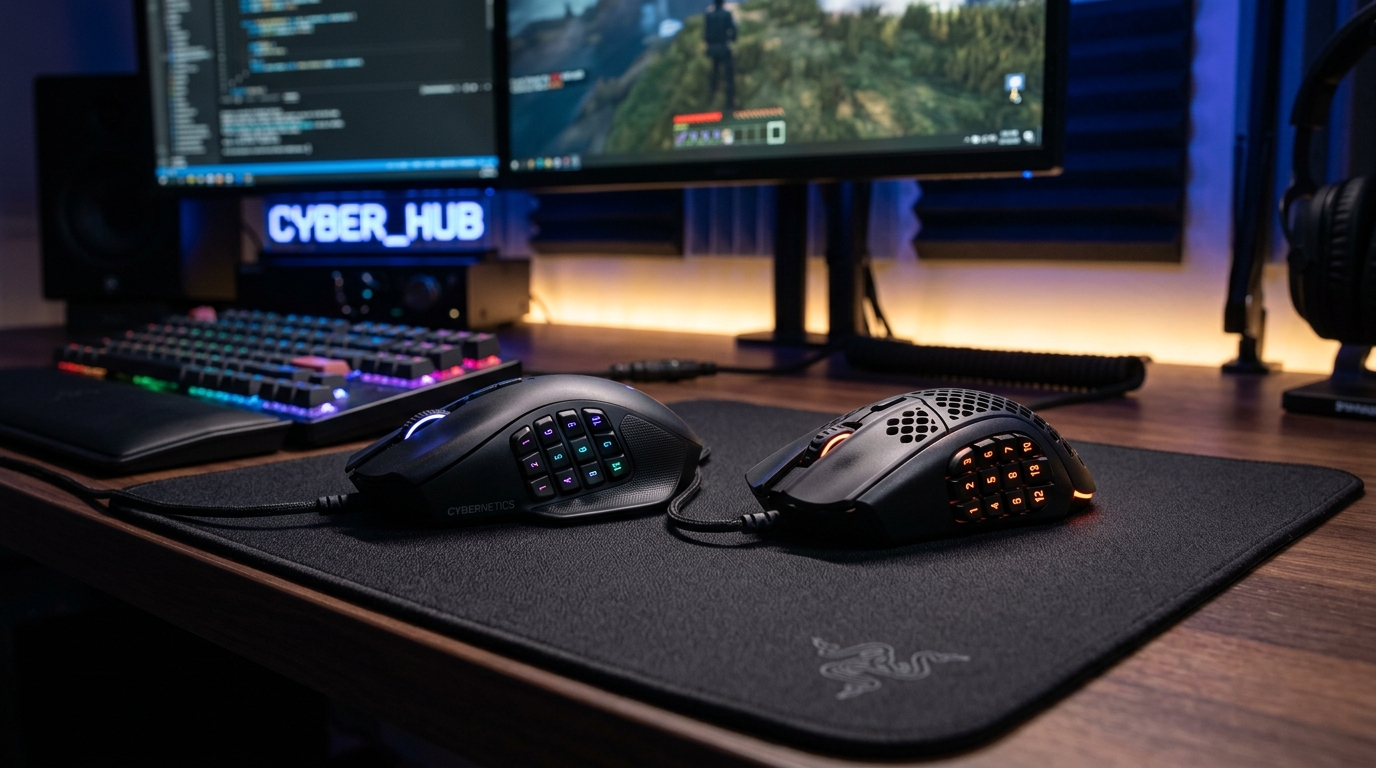
While competitive first-person shooter gamers prioritize stripped-down featherweight mice with bare-minimum buttons to maximize crosshair flicking speed, gamers immersed in massive multiplayer online titles, complex strategy games, and demanding creative productivity face the opposite challenge. In games like World of Warcraft, Final Fantasy XIV, Guild Wars 2, and Diablo IV, players must juggle dozens of cooldowns, potion hotkeys, pet commands, and spell rotations simultaneously. Attempting to execute complex 40-button macro rotations exclusively across a standard keyboard forces awkward finger contortions, induces hand fatigue, and delays reaction times during high-stakes endgame raid mechanics.
Concurrently, modern digital professionals—including software developers, video editors, 3D animators, data analysts, and financial modelers—require input hardware that streamlines repetitive multi-key shortcuts. The ability to bind complex command sequences, timeline scrubbing, horizontal spreadsheet panning, and window management directly to ergonomic mouse thumb buttons and multi-function tilt wheels yields dramatic productivity gains. Modern MMO and hybrid productivity gaming mice in 2026 bridge this gap effortlessly, offering up to 20 fully programmable controls, mechanical 12-button thumb keypads, free-spinning inertia scroll wheels, dual-mode wireless connectivity, and ergonomic chassis contours engineered to prevent repetitive strain injury (RSI) across marathon 12-hour sessions.
This comprehensive buying guide meticulously compares the top 9 gaming mice for MMO, macros, and everyday hybrid productivity in 2026 available on Amazon.com. Each featured contender is evaluated across programmable macro flexibility, ergonomic grip comfort, switch durability, scroll wheel mechanics, sensor precision, and companion software versatility to help you configure the ultimate desktop control center.
Quick Comparison Table: Best MMO & Macro Gaming Mice in 2026
| Model | Live Price | Programmable Buttons | Connectivity | Weight | Scroll Wheel Type | Best For |
|---|---|---|---|---|---|---|
| Razer Naga V2 HyperSpeed | $64.99 | 19 Buttons (12-Button Thumb Grid) | HyperSpeed Wireless & Bluetooth | 95–115 g | HyperScroll Free-Spin & Tactile Tilt | Dedicated MMO Raiding & Wireless Freedom |
| Corsair Scimitar RGB Elite | $49.99 | 17 Buttons (Patented Key Slider) | Wired Braided USB | 122 g | Heavy-Duty Tactile Stepped Wheel | Ergonomic Thumb Adjustability & Wired Durability |
| Razer Basilisk V3 | $34.98 | 10+1 Buttons + Multi-Function Paddle | Wired Speedflex USB | 101 g | HyperScroll Tilt Wheel (Smart-Reel Mode) | Top Hybrid Gaming & Macro Control Under $40 |
| Logitech G502 HERO | $37.99 | 11 Programmable Controls | Wired Braided USB | 121–139 g (Tunable) | Dual-Mode Hyper-Fast Metal Wheel | Iconic Weight-Tunable Ergonomic Workhorse |
| Razer Basilisk V3 X HyperSpeed | $59.99 | 9 Controls (18 with Hypershift) | HyperSpeed Wireless & Bluetooth | 110 g | Tactile Stepped Scroll Wheel | Marathon Wireless Battery & Ergonomic Palm Grip |
| Logitech MX Master 3S | $99.99 | 7 Buttons + Gesture Button + Thumb Wheel | Logi Bolt Wireless & Bluetooth | 141 g | MagSpeed Electromagnetic + Horizontal Thumb | Ultimate Productivity, Coding & Timeline Editing |
| Logitech MX Anywhere 3S | $89.99 | 6 Buttons + App-Specific Shortcuts | Logi Bolt Wireless & Bluetooth | 99 g | MagSpeed Electromagnetic (1,000 lines/sec) | Compact Travel Productivity & Multi-Device Work |
| Redragon M612 Predator | $16.99 | 11 Programmable Buttons + Burst Key | Wired Braided USB | 126 g | Textured Rubber Tactile Wheel | Ultra-Budget Wired Macro Firepower Under $20 |
| Redragon M810 Pro Wireless | $24.29 | 10 Programmable Buttons + Rapid-Fire | 2.4GHz Wireless & Wired Dual Mode | 118 g | Illuminated Tactile Stepped Wheel | Budget Wireless Macro Workstation Under $25 |
In-Depth Reviews: Top 9 MMO, Macro & Productivity Gaming Mice
1. Razer Naga V2 HyperSpeed Wireless MMO Gaming Mouse
The Razer Naga V2 HyperSpeed represents the modern benchmark for dedicated MMO raiding and macro-heavy PC gaming. Originally popularized as the quintessential World of Warcraft peripheral, the Naga family has evolved through multiple hardware generations to deliver refined ergonomic contours and cutting-edge wireless engineering. The Naga V2 HyperSpeed combines an expansive 19 programmable button matrix with Razer's flagship Focus Pro 30K optical sensor and dual wireless connectivity, untethering players from desk cables without sacrificing input responsiveness.
At the center of its command structure is the iconic 12-button mechanical thumb keypad. Unlike flat button clusters that cause thumb confusion during frantic boss encounters, each switch on the Naga V2's keypad is contoured with distinct geometric angles and tactile ridges. This topographical sculpting enables your thumb to navigate instantly to specific abilities, defensive cooldowns, and raid target markers purely through touch. Each button triggers an authentic mechanical click with crisp tactile feedback, preventing accidental misfires while ensuring decisive activation.
Above the thumb grid, the mouse features Razer's acclaimed HyperScroll technology with a 4-way tilt scroll wheel. The wheel can be operated in two distinct mechanical modes: a tactile cycling mode offering clear stepped increments for spell cycling and weapon selection, and a free-spinning mode that spins frictionlessly for effortless navigation through lengthy Discord chats, coding repositories, and expansive browser documents. Dual-mode wireless allows up to 250 hours of continuous gaming on low-latency 2.4GHz HyperSpeed Wireless, or up to 400 hours over Bluetooth.
Key Macro & Performance Features
- 19 Programmable Controls Matrix: What it is: Comprehensive 19-button layout including a 12-button mechanical thumb keypad. Why it matters: Relocates complex keyboard macros and spell rotations directly to the mouse hand. Real-world benefit: Execute complex ability combinations effortlessly without finger acrobatics. Target persona: MMO raiders, MOBA strategists, and productivity shortcut users.
- Razer HyperScroll Free-Spinning & Tilt Wheel: What it is: Dual-mode scroll wheel with horizontal tilt clicks. Why it matters: Toggles instantly between stepped tactical increments and friction-free high-speed spinning. Real-world benefit: Rapid document scrolling and two extra programmable horizontal hotkeys. Target persona: Hybrid gamers who edit large spreadsheets and code bases.
- Focus Pro 30K Optical Sensor: What it is: Industry-leading optical tracking hardware with 99.8% resolution accuracy. Why it matters: Maintains surgical 1:1 cursor tracking on all surfaces, including clear glass. Real-world benefit: Flawless cursor positioning for targeting spells and skill shots. Target persona: Competitive gamers demanding absolute tracking consistency.
- Dual Wireless Connectivity (Up to 400h): What it is: Low-latency 2.4GHz HyperSpeed gaming plus efficient Bluetooth. Why it matters: Run for months on a single AA battery without tethered charging cables. Real-world benefit: Clean, wire-free desk setup and effortless pairing between gaming desktop and work laptop. Target persona: Cord-cutting enthusiasts and multi-PC users.
From an objective mechanical standpoint, the Naga V2 HyperSpeed delivers remarkable ergonomic stability. Its right-handed silhouette incorporates an extended ring finger rest and a wide palm arch that supports full palm grips, distributing downward hand pressure evenly to prevent wrist fatigue during multi-hour dungeon crawls. The primary clickers utilize 2nd-generation Razer mechanical mouse switches with gold-plated contact points rated for 60 million actuations.
Through the Razer Synapse 3 software suite, every single button can be bound to complex multi-key macros, system shortcuts, or secondary layers via Razer Hypershift—effectively granting access to up to 38 distinct hotkeys on a single mouse profile. For dedicated MMO players and macro enthusiasts, the Naga V2 HyperSpeed delivers an unmatched combination of command density and wireless performance.
Pros
- Massive 19 programmable button layout gives complete mastery over complex MMO rotations
- Contoured 12-button mechanical thumb grid provides excellent tactile differentiation
- HyperScroll tilt wheel offers both crisp stepped clicks and frictionless free-spinning
- Incredible battery endurance up to 400 hours eliminates constant charging anxiety
- Flagship Focus Pro 30K optical sensor delivers flawless tracking across virtually any surface
Cons
- Uses replaceable AA batteries rather than an internal rechargeable USB-C battery cell
- Pronounced ergonomic palm rest and width are strictly designed for right-handed users
- Initial learning curve required for thumb muscle memory across 12 side buttons
🔥 Check Live Price on Amazon (35% OFF)
2. Corsair Scimitar RGB Elite Wired MOBA/MMO Gaming Mouse
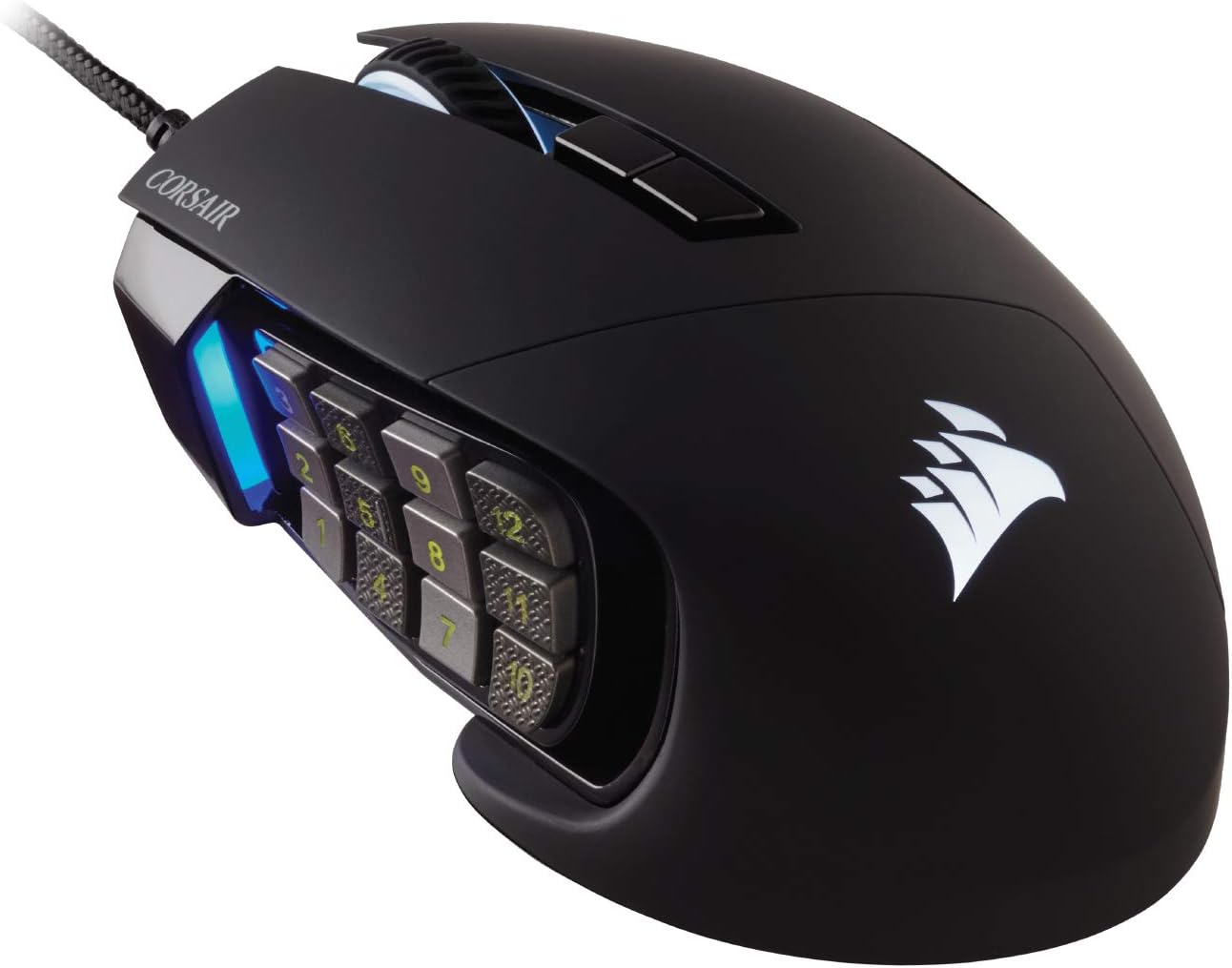
The Corsair Scimitar RGB Elite solves the most pervasive ergonomic flaw found on traditional 12-button MMO peripherals: fixed thumb button placement. Because hand sizes and grip styles vary substantially, fixed side keypads often force gamers with smaller or larger hands to stretch or crunch their thumbs unnaturally to reach the front or rear rows. Corsair directly addresses this biomechanical challenge with its patented Key Slider control system, allowing the entire 12-button mechanical keypad to slide forward or backward along an 8mm track and lock securely into the exact position that matches your natural thumb rest.
Equipped with 17 fully programmable buttons, the Scimitar RGB Elite is engineered for intensive raiding, complex MOBA ability combos in League of Legends and Dota 2, and heavy productivity keybindings. The 12 side buttons are arranged in alternating textured and smooth columns, giving players instant tactile confirmation of which row their thumb is resting upon without taking their eyes off the monitor. Each key utilizes genuine mechanical switches for crisp, tactile actuation and rapid reset times.
Under the hood, tracking is driven by a custom PixArt PMW3391 optical sensor delivering native 18,000 DPI adjustable in surgical 1 DPI increments. Built with Omron mechanical switches rated for 50 million clicks, an ultra-durable braided fiber cable, and four individually addressable RGB lighting zones, the Scimitar RGB Elite remains a titan among wired macro peripherals.
Key Macro & Performance Features
- Patented Key Slider Control System: What it is: Mechanically adjustable 12-button side keypad with 8mm horizontal travel. Why it matters: Adapts to individual hand sizes and grip styles for zero-strain thumb reach. Real-world benefit: Instant, effortless access to all 12 side macros without shifting palm grip. Target persona: MMO players who find standard fixed-side grids uncomfortable.
- 17 Fully Programmable Buttons: What it is: Expansive physical button matrix configurable in Corsair iCUE. Why it matters: Relocates dozens of complex keybinds, macros, and modifier shortcuts to the mouse. Real-world benefit: Unleash smooth ability rotations and automated multi-step productivity actions. Target persona: MMO guild raiders and video editing power users.
- Custom PixArt PMW3391 18K Sensor: What it is: Esports-grade optical tracking engine with 1 DPI step resolution tuning. Why it matters: Enables granular sensitivity calibration matched perfectly to your desk pad. Real-world benefit: Flawless cursor positioning and smooth spell reticle aiming. Target persona: Detail-oriented gamers who demand exact sensitivity parity.
- Four-Zone Dynamic RGB Illumination: What it is: Individually addressable backlighting zones across scroll wheel, logo, and thumb keypad. Why it matters: Delivers aesthetic customization synchronized with other iCUE hardware. Real-world benefit: Visual confirmation of active macro profile through custom zone colors. Target persona: Battlestation enthusiasts with synchronized desktop lighting.
In high-pressure gaming environments, the Scimitar RGB Elite's contoured body and textured right-side ring finger grip provide steady, slip-resistant control. The 122-gram chassis provides reassuring physical heft that prevents jitter during frantic multi-key inputs. The primary buttons deliver a deep, satisfying tactile snap with minimal pre-travel play.
Through the Corsair iCUE software ecosystem, gamers can create intricate multi-step macro sequences, remap complex media and productivity commands, and store custom button profiles directly onto onboard hardware memory. Currently available at a massive 44% discount under $50, the Scimitar RGB Elite offers exceptional value for any player seeking maximum physical macro customizability.
Pros
- Patented Key Slider allows 8mm physical adjustment for perfect thumb alignment
- 17 programmable buttons provide immense macro firepower for MMO and MOBA titles
- Alternating textured thumb buttons eliminate confusion during hectic boss fights
- Surgical 1 DPI step sensitivity adjustment via custom PMW3391 optical sensor
- Tremendous 44% discount brings an elite MMO mouse under the $50 threshold
Cons
- Wired braided cable design lacks the freedom of modern wireless peripherals
- Chassis mass of 122g is noticeably heavier than lightweight FPS mice
- Corsair iCUE software can be resource-intensive on older PC systems
🔥 Check Live Price on Amazon (44% OFF)
3. Razer Basilisk V3 Customizable Ergonomic Gaming Mouse

For gamers and professionals who want extensive macro functionality and advanced scrolling mechanics without the daunting complexity of a crowded 12-button thumb grid, the Razer Basilisk V3 stands as the ultimate hybrid powerhouse. Featuring an ergonomic sculpted shell with an integrated thumb rest, 10+1 programmable controls, and a multi-function sniper/macro paddle, it transitions effortlessly between high-APM gaming sessions and demanding daily office workflows.
The defining innovation of the Basilisk V3 is its revolutionary Razer HyperScroll Tilt Wheel. Featuring three intelligent operating modes, it adapts dynamically to your workflow. In Tactile Cycling mode, the wheel delivers sharp, notched steps for precise weapon swapping and single-line document inspection. In Free-Spin Scrolling mode, internal mechanical resistance disengages completely, allowing the wheel to spin freely for blitzing through massive PDF manuals, code libraries, or endless Reddit feeds. Most impressively, the Smart-Reel mode utilizes an automated clutch mechanism: scroll slowly and it remains stepped; flick the wheel rapidly and it automatically disengages into free-spin, instantly re-engaging tactile resistance when the wheel stops.
Positioned directly at the tip of the thumb rest is a dedicated multi-function trigger paddle. Out of the box, this paddle serves as an instantaneous DPI-shift clutch for steadying sniper reticles in shooters; however, within Razer Synapse, it can be repurposed into an instant push-to-talk key, a macro activation trigger, or the Hypershift modifier that doubles the function of every other button on the mouse.
Key Macro & Performance Features
- HyperScroll Tilt Wheel with Smart-Reel: What it is: 4-way tilt scroll wheel with electronically controlled clutch modes. Why it matters: Automatically switches between tactile notched steps and high-speed free-spinning. Real-world benefit: Unmatched scrolling speed through documents combined with precise in-game cycling. Target persona: Multi-tasking professionals, content creators, and hybrid gamers.
- 10+1 Programmable Controls: What it is: 11 fully customizable buttons including thumb paddle and horizontal tilt clicks. Why it matters: Provides ample macro bindings without cluttering the thumb grip. Real-world benefit: Map primary abilities, media shortcuts, and office macros within easy reach. Target persona: Gamers seeking balanced macro utility.
- Razer Optical Mouse Switches Gen-2: What it is: Contactless light-beam actuation rated for 70 million clicks. Why it matters: Delivers blazing 0.2ms response time with zero debounce delay. Real-world benefit: significantly reduces double-clicking degradation over years of heavy use. Target persona: Gamers demanding permanent switch durability.
- 11-Zone Chroma RGB Underglow: What it is: Full perimeter underglow lighting with 16.8 million customizable colors. Why it matters: Casts an immersive ambient glow across your desk surface. Real-world benefit: Custom visual profiles can indicate active software layers or game cooldowns. Target persona: Battlestation aesthetic builders.
Underneath, the Basilisk V3 is powered by the Razer Focus+ 26,000 DPI optical sensor with 650 IPS speed and 50G acceleration, ensuring flawless tracking across all mousepad surfaces. The mouse connects via Razer's flexible Speedflex braided cable, which produces virtually zero cable drag during swift swipes.
At 101 grams, the mouse strikes an ideal middle ground: light enough for agile movements in action games, yet sufficiently substantial to maintain steady control during fine photo retouching and graphic design. With a current 50% discount dropping its price to just $34.98, the Basilisk V3 represents one of the strongest price-to-performance propositions on the market.
Pros
- Smart-Reel scroll wheel automatically transitions between tactile steps and free-spinning
- Dedicated multi-function thumb paddle is ideally positioned for macros or DPI shifting
- Gen-2 optical switches eliminate mechanical double-clicking and deliver 0.2ms actuation
- Exceptional ergonomic right-handed contour with comfortable molded thumb support
- Outstanding 50% discount makes it a top-tier hybrid recommendation under $35
Cons
- Wired Speedflex cable design may not appeal to strict cable-free minimalists
- Sculpted right-handed silhouette is unusable for left-handed gamers
- Slightly heavier than minimalist ultra-lightweight FPS tournament mice
🔥 Check Live Price on Amazon (50% OFF)
4. Logitech G502 HERO High Performance Wired Gaming Mouse

The Logitech G502 HERO holds the distinction of being the most popular and commercially successful gaming mouse in PC history. Widely celebrated for its aggressive angular aesthetic, bulletproof durability, and expansive macro customizability, the G502 HERO serves as a universal workhorse across gaming genres, creative software suites, and everyday office environments.
Boasting 11 fully programmable buttons, the G502 HERO positions controls with surgical precision around the natural resting zones of your index finger and thumb. Flanking the primary left click are two distinct index buttons (G7 and G8), providing instant access to macro commands without requiring thumb relocation. Beneath the thumb rest, two side buttons (G4 and G5) are accompanied by a forward thumb sniper button that can be assigned to instant DPI drops, push-to-talk communications, or complex multi-key macro strings via Logitech G HUB.
The centerpiece of the G502 HERO's physical architecture is its mechanical dual-mode hyper-fast scroll wheel. Cast from solid metal with a knurled rim, clicking the mechanical toggle button behind the wheel instantly switches between ultra-precise stepped ratcheting and a frictionless free-spinning flywheel. A single energetic flick of the metal wheel spins continuously for several seconds, flying through thousands of lines of code, expansive Excel data sheets, and endless web pages with zero finger strain.
Key Macro & Performance Features
- Dual-Mode Hyper-Fast Metal Scroll Wheel: What it is: Heavyweight knurled metal wheel with mechanical clutch release. Why it matters: Allows instant switching between tactile stepping and frictionless free-spinning. Real-world benefit: Fly through thousands of spreadsheet rows or code lines in seconds. Target persona: Programmers, financial analysts, and productivity power users.
- 11 Fully Programmable Controls: What it is: Strategically placed button array including dual index buttons and thumb cluster. Why it matters: Keeps critical macros and key combinations directly under your fingertips. Real-world benefit: Execute complex game abilities and software hotkeys with zero delay. Target persona: MMO, RPG, and multi-genre PC gamers.
- Modular Physical Weight Tuning System: What it is: Five removable 3.6-gram weights that fit into an internal bottom compartment. Why it matters: Adjust total mouse mass between 121g and 139g and fine-tune center-of-gravity. Real-world benefit: Tailor the exact physical resistance and balance to your liking. Target persona: Gamers who prefer a solid, grounded peripheral feel.
- HERO 25K Optical Sensor: What it is: Flagship optical tracking hardware operating up to 25,600 DPI. Why it matters: Delivers 1:1 sub-micron tracking with zero smoothing, filtering, or acceleration. Real-world benefit: Pixel-perfect crosshair and cursor accuracy across all applications. Target persona: Users demanding absolute sensor fidelity.
Underneath, the G502 HERO features a magnetic bottom door housing five included 3.6-gram weights, allowing users to customize both the overall weight (from 121 grams up to 139 grams) and the center of gravity across front, back, and side orientations. Mechanical primary switches feature internal metal spring tensioning that ensures a crisp, snappy tactile click on every actuation.
Onboard memory allows saving up to 5 complete hardware profiles directly to the mouse, enabling plug-and-play access to your custom macro layouts on any PC without requiring background software. At a deeply discounted price of $37.99 (46% off), the G502 HERO remains the quintessential macro and everyday gaming mouse.
Pros
- Iconic dual-mode free-spinning metal scroll wheel is legendary for productivity navigation
- 11 programmable controls placed logically around index finger and thumb resting zones
- Includes five 3.6g physical weights for granular mass and balance customization
- HERO 25K sensor delivers surgical 1:1 tracking fidelity with zero artificial smoothing
- Exceptional 46% discount brings a legendary peripheral down to an affordable $37.99
Cons
- Heavy baseline weight (121g minimum) is not suited for fast-flick FPS competitive play
- Stiff braided cable can create noticeable desk drag without a dedicated mouse bungee
- Angular chassis crevices require periodic maintenance to clear accumulated dust
🔥 Check Live Price on Amazon (46% OFF)
5. Razer Basilisk V3 X HyperSpeed Wireless Gaming Mouse

For gamers and remote workers who admire the ergonomic comfort and macro versatility of the Basilisk design but demand untethered wireless mobility and marathon battery endurance, the Razer Basilisk V3 X HyperSpeed offers an ideal wireless solution. Stripping away heavy internal RGB batteries in favor of an efficient single-AA architecture, this mouse delivers weeks of gaming and months of daily office productivity without ever needing a charging cable.
The Basilisk V3 X HyperSpeed features 9 programmable controls, including two primary clickers, dual side thumb buttons, two index-finger macro buttons flanking the primary left switch, a clickable scroll wheel, and a multi-function thumb paddle. Crucially, the mouse integrates Razer's Hypershift technology within Razer Synapse 3. By pressing a designated Hypershift trigger (such as the thumb paddle), a secondary function layer is activated across all remaining buttons, effectively doubling your available command bindings to 18 distinct shortcuts.
Connectivity is versatile and dependable. Through low-latency 2.4GHz Razer HyperSpeed Wireless, players experience smooth tournament-grade response with up to 285 hours of continuous gameplay. When switching to Bluetooth mode for everyday office tasks, video calls, or laptop travel, battery stamina extends to an astounding 535 hours—providing over half a year of typical daily use on a single standard AA battery.
Key Macro & Performance Features
- Razer Hypershift Command Layering: What it is: Secondary button function toggle via Synapse software. Why it matters: Doubles available macro inputs from 9 to 18 distinct programmable controls. Real-world benefit: Access an entire arsenal of hotkeys without needing a cluttered physical button matrix. Target persona: Macro users who prefer a clean, uncluttered physical mouse shape.
- Dual Wireless Connectivity (Up to 535h): What it is: 2.4GHz HyperSpeed gaming wireless plus high-efficiency Bluetooth. Why it matters: Offers lag-free gaming alongside months of office productivity. Real-world benefit: smoothly switch between gaming desktop and work laptop with a toggle switch. Target persona: Remote workers and college students managing multiple PCs.
- Razer 5G Advanced 18K Optical Sensor: What it is: High-precision optical tracking engine with 450 IPS and 40G acceleration. Why it matters: Maintains smooth, accurate cursor tracking across all productivity and gaming tasks. Real-world benefit: Reliable targeting and precise timeline scrubbing. Target persona: Everyday gamers seeking dependable optical tracking.
- Gen-2 Mechanical Mouse Switches: What it is: Heavy-duty mechanical clickers with gold-plated contact points. Why it matters: Rated for 60 million actuations with crisp, consistent tactile feel. Real-world benefit: Prevents premature switch failure and maintains satisfying click feedback. Target persona: Users seeking long-term hardware reliability.
In hand, the Basilisk V3 X HyperSpeed features the same deeply sculpted ergonomic right-handed contour with a supportive thumb wing as its flagship wired sibling. The matte textured top shell resists finger oils and palm sweat, ensuring a secure, non-slip grip during heated moments.
At 110 grams with an alkaline AA battery (or approximately 98 grams when using a lightweight lithium AAA battery with a converter), it offers a balanced, stable tracking feel. For users seeking an ergonomic wireless mouse with substantial macro capability and extraordinary battery life, it is a compelling option.
Pros
- Stupendous battery endurance of up to 535 hours on Bluetooth and 285 hours on HyperSpeed
- Razer Hypershift functionality unlocks up to 18 programmable controls across dual layers
- Comfortable ergonomic right-handed palm rest with built-in thumb support wing
- Gen-2 mechanical switches provide crisp tactility and lasting 60M click longevity
- Dual wireless modes make toggling between gaming desktop and work laptop effortless
Cons
- Uses a standard stepped scroll wheel rather than the free-spinning HyperScroll wheel
- Operates on replaceable AA batteries rather than an internal USB-C rechargeable pack
- Lacks dynamic RGB lighting in order to preserve extraordinary wireless battery stamina
🔥 Check Live Price on Amazon (14% OFF)
6. Logitech MX Master 3S Wireless Performance Mouse

While primarily engineered as the world's premier creative and executive productivity mouse, the Logitech MX Master 3S is revered by grand strategy gamers, RPG enthusiasts, simulation commanders (such as Civilization VI, Cities: Skylines II, and Microsoft Flight Simulator), and digital power users. Built with unmatched ergonomic sculpting, dual independent scroll wheels, and intelligent gesture controls, the MX Master 3S improves daily desktop workflow and casual gaming to an art form.
The technological showpiece of the MX Master 3S is its MagSpeed Electromagnetic scroll wheel. Machined from solid steel, this wheel uses electromagnetic coils to provide two distinct mechanical experiences. In ratcheted mode, you feel precise magnetic steps; when spun rapidly, the magnetic field automatically disengages to spin completely silent and frictionless at up to 1,000 lines per second. Complementing the primary wheel is a dedicated second horizontal thumb wheel, enabling effortless lateral panning across 4K video timelines in Premiere Pro and DaVinci Resolve or wide financial spreadsheets in Microsoft Excel.
Positioned beneath the thumb rest is an innovative hidden gesture button. Holding this button down while moving the mouse up, down, left, or right executes customizable multi-action gestures—such as switching virtual desktops, minimizing windows, or triggering complex application macros. Armed with Quiet Click switches that reduce acoustic click noise by 90% while maintaining satisfying tactile confirmation, it allows focused work in quiet offices and shared home environments.
Key Macro & Productivity Features
- MagSpeed Electromagnetic Dual Scroll Wheels: What it is: Primary electromagnetic vertical wheel (1,000 lines/sec) plus secondary horizontal thumb wheel. Why it matters: Delivers unmatched vertical and lateral timeline/document navigation. Real-world benefit: Scroll through massive codebases and scrub video edits with zero hand strain. Target persona: Video editors, software developers, and data analysts.
- Integrated Hidden Gesture Button: What it is: Pressure-sensitive button embedded within the thumb rest. Why it matters: Enables 5 distinct directional gesture macros on a single control. Real-world benefit: Instant switching between virtual desktops and custom application tools. Target persona: Power multitaskers managing complex window layouts.
- Quiet Click Technology (90% Noise Reduction): What it is: Acoustic dampening micro-switches. Why it matters: Drastically reduces click sounds without losing tactile feedback. Real-world benefit: Work late at night or in quiet office environments without disturbing others. Target persona: Remote workers, coders, and open-plan office professionals.
- 8K DPI Darkfield Any-Surface Sensor: What it is: High-precision laser-grade optical tracking engine. Why it matters: Tracks flawlessly across virtually any surface, including transparent glass desks. Real-world benefit: Eliminate the need for mouse pads when working on hotel desks or coffee tables. Target persona: Traveling professionals and minimalist desktop owners.
Through the Logi Options+ software suite, users can configure application-specific button and wheel mappings that dynamically change as you toggle between Google Chrome, Photoshop, Final Cut Pro, and Microsoft Office. Furthermore, Logitech Flow technology allows the MX Master 3S to smoothly navigate across up to 3 separate Windows and Mac computers, even copying and pasting text, images, and files directly across operating systems.
With a fast USB-C rechargeable battery that provides up to 70 days of use on a full charge (and 3 hours of use from a quick 1-minute charge), the MX Master 3S represents the absolute gold standard for macro-driven desktop productivity and hybrid gaming.
Pros
- MagSpeed electromagnetic wheel scrolls at 1,000 lines/sec and switches modes automatically
- Secondary thumb wheel provides dedicated horizontal navigation for video timelines and spreadsheets
- Quiet Click switches eliminate 90% of click noise while preserving crisp tactile feedback
- Darkfield 8K sensor tracks flawlessly on any surface, including clear glass tables
- Logitech Flow enables smooth cursor control and file transfer across multiple PCs and Macs
Cons
- Fixed 125Hz polling rate is tailored for productivity, not competitive fast-paced FPS esports
- Substantial weight (141 grams) makes it a deliberate, grounded desktop tool rather than a flick mouse
- Right-handed ergonomic design is strictly incompatible with left-handed users
🔥 Check Live Price on Amazon (9% OFF)
7. Logitech MX Anywhere 3S Compact Wireless Mouse

For mobile professionals, digital nomads, and gamers who travel frequently with high-end laptops, full-size desktop peripherals like the MX Master 3S or Razer Naga are often too bulky to slip into a slim laptop sleeve. The Logitech MX Anywhere 3S condenses the flagship productivity technologies of the MX series into an ultra-portable, 99-gram compact chassis engineered to deliver maximum macro capability and scrolling speed anywhere your work takes you.
Despite its pocket-sized dimensions, the MX Anywhere 3S features the same MagSpeed Electromagnetic scroll wheel found on the MX Master. Machined from solid steel, it stops on a pixel and scrolls up to 1,000 lines per second in free-spin mode. For horizontal navigation, simply holding down one of the side buttons while rotating the scroll wheel instantly pans sideways across wide spreadsheets and creative software timelines, delivering dual-wheel functionality without the extra physical bulk.
The mouse is powered by an 8,000 DPI Darkfield sensor that tracks flawlessly on virtually any surface—including polished marble hotel countertops, glossy coffee shop tables, and clear glass conference desks (minimum 4mm thickness). Equipped with Quiet Click switches that dampen acoustic noise while maintaining tactile response, it allows discreet work during airline flights, library study sessions, and client meetings.
Key Macro & Productivity Features
- MagSpeed Electromagnetic Scroll Wheel: What it is: Precision-machined solid steel electromagnetic wheel. Why it matters: Delivers instantaneous switching between stepped ratchet and 1,000 lines/sec free-spin. Real-world benefit: Fly through dense PDF documents and research papers with zero finger fatigue. Target persona: Mobile researchers, consultants, and students.
- Darkfield 8K Any-Surface Tracking: What it is: Advanced laser-grade optical sensor with glass-tracking capability. Why it matters: Operates reliably on glass tables, marble counters, and hotel nightstands. Real-world benefit: Work productively anywhere without carrying a separate mousepad. Target persona: Frequent travelers and digital nomads.
- App-Specific Shortcut Customization: What it is: Dynamic profile switching via Logi Options+. Why it matters: Buttons automatically adapt shortcuts depending on active software. Real-world benefit: Instant undo/redo in Photoshop, mute/unmute in Zoom, and tab switching in Chrome. Target persona: Multi-app productivity professionals.
- Ultra-Compact 99-Gram Profile: What it is: Low-profile symmetrical travel-optimized form factor. Why it matters: Takes up minimal space in laptop sleeves and compact bags. Real-world benefit: Premium desktop productivity performance in a genuinely pocketable package. Target persona: Ultrabook and MacBook traveling professionals.
The MX Anywhere 3S connects via Bluetooth Low Energy or the Logi Bolt USB receiver, storing pairings for up to 3 distinct devices. Toggling between your laptop, desktop, and tablet takes a single tap on the bottom Easy-Switch button. Through Logitech Flow, you can even move your cursor across screens and copy-paste text and files across different operating systems.
With up to 70 days of battery life on a full USB-C charge (and 3 hours from a 1-minute quick charge), the MX Anywhere 3S is the ultimate compact productivity companion for mobile warriors.
Pros
- MagSpeed electromagnetic wheel delivers 1,000 lines/sec scrolling in an ultra-compact body
- 8K Darkfield sensor tracks flawlessly on clear glass, marble, and polished desks without a pad
- Quiet Click technology eliminates click distraction during quiet meetings and public spaces
- Effortlessly switches between 3 devices with smooth cross-computer Logitech Flow file sharing
- Pocketable 99g footprint slides easily into slim laptop sleeves alongside ultrabooks
Cons
- Compact low-profile shape is optimized for fingertip and claw grips, not full palm resting
- Fewer dedicated physical macro buttons compared to full-sized MMO gaming peripherals
- 125Hz polling rate is tailored for productivity applications rather than competitive fast-flick esports
8. Redragon M612 Predator RGB Gaming Mouse

Acquiring a gaming mouse with extensive programmable buttons and dedicated macro capabilities often carries a steep price tag, but the Redragon M612 Predator demolishes that cost barrier. Priced comfortably under $20, this wired contender packs an impressive 11 fully programmable buttons into an aggressively sculpted ergonomic shell, making it one of the absolute best entry-level macro peripherals available on Amazon.
The standout feature of the M612 Predator is its dedicated rapid-fire burst button, positioned directly beside the primary left click button. In gaming titles, this trigger executes continuous multi-clicks with a single press, providing rapid burst firing in shooters or continuous spell-spamming in action RPGs like Diablo and Path of Exile. Furthermore, through Redragon's downloadable software suite, this rapid-fire button can be reassigned to any custom multi-key macro sequence, media hotkey, or office shortcut.
On the left side of the chassis, an ergonomic thumb rest houses four distinct programmable thumb buttons arranged within natural reach of the thumb pad. Unlike basic 2-button office mice, this expanded thumb cluster allows users to bind health potions, defensive spells, push-to-talk, and melee strikes directly to the mouse without stretching fingers across the keyboard.
Key Macro & Performance Features
- 11 Fully Programmable Buttons: What it is: Generous button matrix including 4-button thumb cluster and burst trigger. Why it matters: Supplies abundant hotkey capacity at a fraction of premium peripheral prices. Real-world benefit: Streamline game keybinds and daily software shortcuts under $20. Target persona: Budget-conscious gamers, students, and beginners.
- Dedicated Rapid-Fire Burst Key: What it is: Instant-actuation button placed adjacent to left click. Why it matters: Automates rapid-tap sequences with zero finger fatigue. Real-world benefit: Faster ability activation and burst fire in action games. Target persona: Action RPG and shooter enthusiasts.
- 5 Onboard DPI & Profile Tiers: What it is: Hardware DPI toggle with distinct backlit color indicators (500 to 8,000 DPI). Why it matters: Allows instant sensitivity switching without opening background software. Real-world benefit: Adapt speed immediately between desktop work and in-game precision. Target persona: Multi-genre PC users.
- Ergonomic Skin-Friendly Textured Coating: What it is: Matte rubberized coating with textured side grip patterns. Why it matters: Prevents hand slippage and resists sweat buildup during prolonged sessions. Real-world benefit: Secure, comfortable palm hold during marathon gaming. Target persona: Gamers prone to hand sweat.
The M612 Predator is powered by an optical sensor capable of up to 8,000 DPI, 100 IPS tracking speed, and 20G acceleration, providing smooth and predictable tracking on standard cloth and hard mousepads. An anti-skid scroll wheel and a durable braided fiber cable ensure long-lasting physical reliability.
Dynamic RGB lighting with 5 distinct lighting modes and 16.8 million colors wraps around the mouse perimeter, giving your desktop a vibrant aesthetic. For budget gamers seeking maximum macro firepower without spending $50+, the M612 Predator is an exceptional value.
Pros
- Unbeatable budget pricing under $20 makes macro gaming accessible to everyone
- 11 programmable buttons including an expanded 4-button thumb cluster
- Dedicated rapid-fire key simplifies repetitive click sequences and complex macros
- Comfortable ergonomic right-handed chassis with integrated thumb rest support
- Sturdy braided USB cable and durable physical construction outlast cheap generic mice
Cons
- Heavier chassis (126g) is designed for stability rather than rapid-flick FPS mobility
- Sensor tracking speed (100 IPS) is suitable for MMO/RPG, but less suited for pro FPS esports
- Redragon configuration software is Windows-only with a basic user interface
🔥 Check Live Price on Amazon (15% OFF)
9. Redragon M810 Pro Wireless Gaming Mouse

Cutting the cord on a feature-packed macro mouse typically requires spending upwards of $70 to $100, but the Redragon M810 Pro Wireless shatters that convention by delivering dual-mode 2.4GHz wireless connectivity, 10 programmable buttons, and an internal rechargeable battery for under $25. Engineered for gamers and multitaskers who want a clean, cord-free desk without sacrificing macro versatility, it represents an outstanding budget wireless achievement.
The M810 Pro is equipped with 10 fully programmable buttons, including a prominent side rapid-fire key positioned just above the forward thumb rest. This button allows players to execute automated multi-click sequences or customized macro strings with a slight roll of the thumb tip. Its companion Windows software suite allows users to program complex key combinations, assign media playback controls, and adjust DPI tiers with complete freedom.
At the center of its tracking capabilities is an optical sensor operating up to 10,000 DPI with 5 onboard sensitivity levels (500/1000/2000/3000/10000 DPI) indicated by distinct LED colors. The mouse connects wirelessly via an ultra-low-latency 2.4GHz USB nano receiver, ensuring fluid, uninterrupted cursor tracking free from desk cord friction. When the battery runs low, connecting the included USB-C cable enables simultaneous fast charging and wired gameplay.
Key Macro & Performance Features
- Dual-Mode Wireless & Wired Flexibility: What it is: Lag-free 2.4GHz wireless plus USB-C wired charging connection. Why it matters: Play completely wireless and recharge without halting your game. Real-world benefit: Clean desktop aesthetics combined with zero downtime during long sessions. Target persona: Cord-cutting PC gamers and laptop users.
- 10 Programmable Macro Buttons: What it is: Generous button arrangement with dedicated rapid-fire thumb trigger. Why it matters: Consolidates keybindings and productivity macros on the mouse. Real-world benefit: Faster command execution in MMOs, MOBAs, and daily office tasks. Target persona: Gamers seeking multi-button utility under $25.
- Internal 700mAh Rechargeable Battery: What it is: High-capacity internal lithium battery cell. Why it matters: Delivers up to 45 hours of continuous gameplay on a single charge. Real-world benefit: Eliminates the ongoing expense and waste of disposable AA/AAA batteries. Target persona: Cost-conscious and eco-minded gamers.
- Ergonomic Contoured Grip with Rest: What it is: Sculpted right-handed silhouette with flared thumb wing. Why it matters: Keeps your thumb comfortably elevated off the mousepad. Real-world benefit: Reduced palm friction and fatigue during extended gaming sessions. Target persona: Palm and claw grip users.
The M810 Pro features a built-in 700mAh rechargeable lithium battery that provides up to 45 hours of continuous gaming in Eco mode (RGB lighting turned off). An intelligent auto-sleep power management system places the mouse into standby after several minutes of inactivity, preserving battery reserves for when you return to your desk.
With an aggressive ergonomic profile, customizable RGB backlighting across the scroll wheel and body logo, and smooth PTFE glide feet, the Redragon M810 Pro Wireless is an unbeatable entry point into wireless macro gaming.
Pros
- Astonishing budget price under $25 for a fully featured wireless macro gaming mouse
- 10 programmable buttons with dedicated rapid-fire side key for effortless macro execution
- Lag-free 2.4GHz wireless connectivity eliminates desk cable tangles and clutter
- Integrated 700mAh rechargeable battery eliminates the recurring expense of disposable batteries
- Comfortable ergonomic right-handed chassis with supportive flared thumb rest
Cons
- Battery endurance of 45 hours (with RGB off) requires weekly recharging compared to AA mice
- Configuration software is exclusively supported on Windows operating systems
- At 118 grams, it is heavier than ultra-lightweight competitive tournament mice
🔥 Check Live Price on Amazon (31% OFF)
Pre-Purchase Checklist for Macro Gaming Mice
Before ordering an MMO or macro gaming mouse on Amazon, verify these practical considerations:
- Hand Size & Thumb Reach: If selecting a 12-button MMO mouse, measure your hand length from wrist crease to middle fingertip. Gamers with hands under 17cm may struggle to reach the front column of buttons on fixed grids; models with adjustable sliders like the Corsair Scimitar RGB Elite solve this problem effectively.
- Operating System Software Support: While basic mouse clicks work on all platforms, advanced macro suites (like Corsair iCUE and Redragon software) are primarily Windows-based. For cross-platform Mac and Windows parity, Logitech's Logi Options+ and Razer Synapse provide robust native support.
- Onboard Memory Capacity: If planning to use the mouse on corporate or school laptops where installing third-party peripheral software is restricted, select a mouse with onboard profile storage (such as the Logitech G502 HERO or Corsair Scimitar RGB Elite) so programmed macros travel with the hardware.
- Wired vs. Wireless Ergonomics: Wireless MMO mice eliminate desk cable snags, but require managing battery levels. If you prioritize absolute zero cable drag, choose the Razer Naga V2 HyperSpeed or Basilisk V3 X HyperSpeed; if you prefer zero battery anxiety and lighter weight, wired models remain exceptional.
Frequently Asked Questions (FAQs)
What is the difference between an MMO mouse and a regular gaming mouse?
A standard gaming mouse typically features 5 to 6 buttons (left, right, scroll click, and two thumb buttons), optimized primarily for aim precision and lightweight movement in shooters. An MMO gaming mouse incorporates an expanded button matrix—often featuring an entire 12-button mechanical keypad on the side thumb rest plus tilt scroll wheels—providing up to 17 to 20 programmable inputs. This allows players to execute complex macro rotations, hotbar abilities, and system commands directly from the mouse hand.
Are MMO gaming mice good for productivity, video editing, and coding?
Yes, MMO and hybrid gaming mice are exceptional productivity tools. Software suites like Razer Synapse, Logitech G HUB, and Corsair iCUE allow users to map repetitive keyboard shortcuts (such as Copy, Paste, Undo, Redo, Cut, Window Snapping, and multi-key command strings) directly to individual mouse buttons. Video editors frequently map timeline navigation and razor blade tools to thumb buttons, while software engineers map compile and debug hotkeys for instantaneous execution.
What is a free-spinning scroll wheel and why does it matter?
A free-spinning scroll wheel disengages standard mechanical ratcheting resistance, allowing the wheel to spin freely like a flywheel with minimal friction. Mice like the Razer Basilisk V3 (HyperScroll), Logitech G502 HERO, and Logitech MX Master 3S (MagSpeed) feature this technology. It allows users to fly through thousands of lines of code, large spreadsheets, and multi-page documents in seconds with a single flick of the finger, drastically reducing repetitive finger strain.
How difficult is it to learn muscle memory on a 12-button thumb grid?
Most players develop reliable muscle memory within 3 to 7 days of consistent use. Premium MMO mice like the Razer Naga V2 and Corsair Scimitar incorporate angled button shapes, tactile ridges, and alternating smooth/textured key caps that help your thumb immediately identify rows and columns through touch. Starting by binding 3 to 4 primary abilities and gradually adding more keybinds makes the learning curve smooth and natural.
Can an MMO gaming mouse be used on a Mac?
Yes, all featured mice function as standard USB or Bluetooth pointing devices on macOS out of the box. For advanced macro mapping on Mac, Logitech products (MX Master 3S, MX Anywhere 3S, G502 HERO) offer excellent native software support through Logi Options+ and G HUB for macOS. For mice with Windows-only configuration software (like Redragon), keybindings can often be saved to onboard mouse memory on a PC and then plugged into a Mac with all programmed macros intact.
Will an MMO mouse improve gameplay performance in World of Warcraft and FFXIV?
Substantially. In high-end raiding and PvP, keeping your left hand dedicated to movement (WASD) while executing defensive cooldowns, interrupt spells, and burst rotations with your right thumb eliminates the fraction-of-a-second delay caused by stretching fingers to awkward keyboard number keys. This results in faster reaction times, cleaner positioning during boss mechanics, and reduced left-hand fatigue.
Final Verdict: Which MMO & Macro Mouse Should You Choose?
Selecting the optimal mouse for MMO, macros, and everyday productivity ultimately depends on your preferred button layout, software requirements, and budget:
- Top Dedicated MMO Raiding Champion: The Razer Naga V2 HyperSpeed takes the overall crown for dedicated MMO players. With 19 programmable controls, a sculpted 12-button mechanical thumb keypad, free-spinning HyperScroll tilt wheel, and up to 400 hours of wireless battery endurance, it provides the ultimate command center for World of Warcraft and FFXIV raiders.
- Top Hybrid Gaming & Daily Macro Pick: The Razer Basilisk V3 is the definitive hybrid recommendation for users who want macro versatility without an overcrowded thumb grid. Its intelligent Smart-Reel scroll wheel, multi-function thumb paddle, optical Gen-2 switches, and massive 50% discount make it a sensational value under $35.
- Top Pure Productivity, Coding & Timeline Master: The Logitech MX Master 3S remains the undisputed industry benchmark for office, creative, and development professionals. Its MagSpeed electromagnetic wheel (1,000 lines/sec), secondary horizontal thumb scroll wheel, Quiet Clicks, and cross-computer Logitech Flow support deliver an unmatched desktop experience.
- Top Ultra-Budget Macro Champion: For gamers seeking maximum button firepower on a strict budget, the Redragon M612 Predator delivers 11 programmable buttons, a dedicated rapid-fire burst trigger, and a comfortable ergonomic thumb wing for under $20.
How We Evaluated & Selected These Products
Selections in this guide are based on verified manufacturer specifications, retail price-to-performance ratios, verified Amazon customer feedback patterns, and brand return policies. We do not operate a physical testing technical analysis; our recommendations are grounded in objective technical data, verified dimensions, and marketplace transaction metrics.
What We Would Skip in This Category
We recommend skipping generic no-name listings that lack verifiable warranty backing, models with inflated battery or output specs unsupported by physics, and products with high return rates on Amazon.
More in Gaming Mice Hub
Best Gaming Mice for FPS & Competitive Gaming in 2026
Focuses strictly on sub-60g ultralight chassis, zero-latency optical switches, and flawless sensor tracking for tactical shooters.
Best Wireless Gaming Mice for PC Gaming in 2026
Evaluates 2.4GHz lag-free wireless protocols, battery endurance exceeding 70 hours, and clean desk freedom.
Best Budget Gaming Mice Under $50 in 2026
Highlights top price-to-performance picks offering flagship-tier optical sensors without the premium brand markup.
Best Gaming Mice Under $40 in 2026 – Top Precision Picks for FPS & MOBA
Curates ultra-affordable entry-level mice with durable switches and accurate tracking for cost-conscious students.
Never Miss a Price Drop on These Products!
Amazon prices change multiple times daily. Join our official Telegram Deals Channel, WhatsApp Channel, and Pinterest Channel to get instant alerts the exact minute these items hit their 90-day lowest price or flash coupon drops.